Transitioning to iNZight 4.2
iNZight 4.2 includes some significant changes to the user interface, so here we have provided a basic guide to transitioning to the new version.
Switching between variable and spreadsheet view
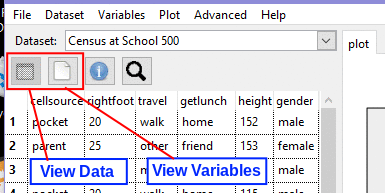
When you load iNZight, you'll notice a more concise interface in the top-left corner of the window. This has allowed us to add some new features, at the cost of removing the large "View Variables" and "View Dataset" buttons and replacing them with smaller icons. In the image below, the two buttons are highlighted:
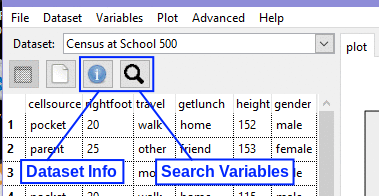
In addition, there are some new buttons. These allow you to show a summary of the dataset, and search for variables within the dataset so you can quickly find what you need:
Pagination of the spreadsheet
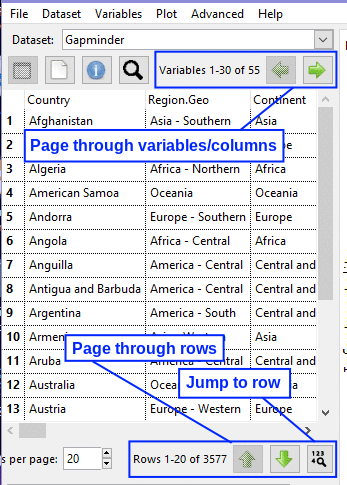
Another big change is that iNZight no longer displays the entire dataset. This only worked for small datasets, and added to the initial load time of the interface. By only displaying a subset of columns and rows, iNZight can now display row-level data for all datasets, no matter how large! The controls for paging through rows are at the bottom of the spreadsheet, and — where applicable — column controls are just above the spreadsheet:
Window button changes
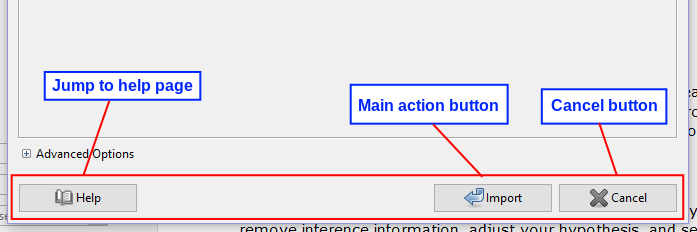
In the new version of iNZight, all of the module windows (those that pop up for additional user input) have been rebuilt to ensure that the buttons (OK / Cancel) are in a consistent order and look the same across windows. This should make using iNZight a lot more intuitive, but you'll have to be a little careful if there are some actions you've used quite frequently in case the OK and Cancel buttons have switched places.
We have used the operating system default order for these buttons, so the main action ("OK") button is on the left on Windows, and on the right on Linux.
Some other windows have been changed slightly in their layout, but these are minor and should not affect usage. For example, in some windows where two previews are shown, these are now side-by-side instead of one on top of the other.