Aggregate
This allows you to aggregate a date or time variable to a lower level of detail. For example, you can convert a daily variable to a monthly variable by aggregating the daily values to the monthly level.
To aggregate, go to Variables > Dates and Times > *Aggregate to....
Converts to
- a weekly (e.g. 2019 W7),
- monthly (e.g. 2019 M5),
- quarterly (e.g. 2019 Q3), or
- yearly (e.g. 2019) variable
in the form that the time series module likes and aggregates using sum, mean, or median.
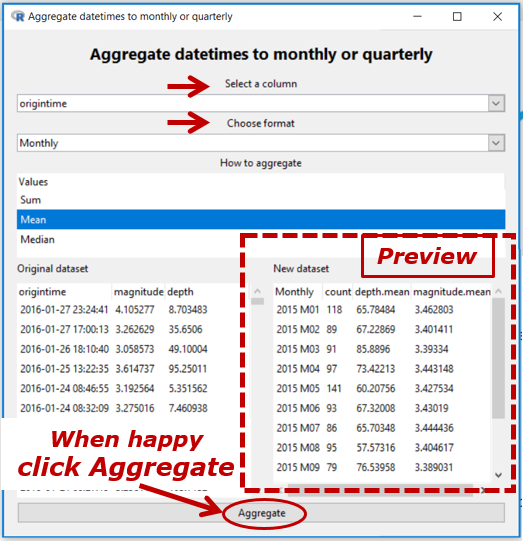
In the Example, origintime is a date-time variable (thus, annotated (t) in View Variables) and we have chosen to convert it to monthly (yyyy Myy) with all of the values in the same month aggregated to their mean.
The count column shows how many values have been aggregated. If there are missing values present in a variable being aggregated, then another column of the form variable.missing. Missing values are ignored when aggregating.
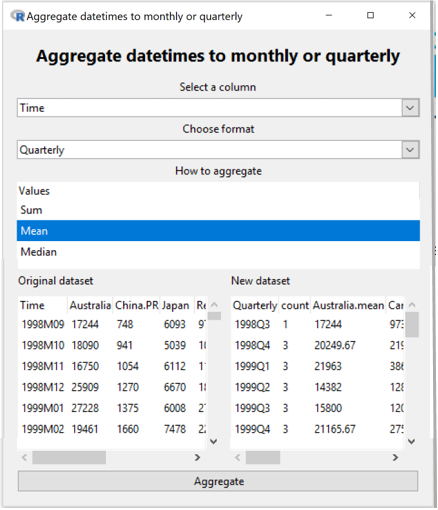
In the Example below a categorical variable in monthly (yyyy Mzz) format is aggregated to quarterly (yyyy Qz).