Joins
This "joins", or brings together, information in two data sets: the current dataset in iNZight and a newly imported dataset (read in using the Import data facility) shown at the mid-right.
Left Join: The most important joining method is called a Left Join, the main purpose of which is to add new variables to the original dataset by extracting the information from the new dataset.
Matching rows: (Not yet fully implemented in Lite.) The main problem is to identify what pieces of information belong together. The most straightforward case occurs where there is a variable in the original dataset which is a unique identifier. If that variable is also in the imported dataset (even if under a different name) we can use it to match up the data which belongs to the same unit/entity.
To partially automate the process, iNZight looks for variables with the same name in both datasets (originally x1, x2, and x3 in the example) and offers those for determining matches.
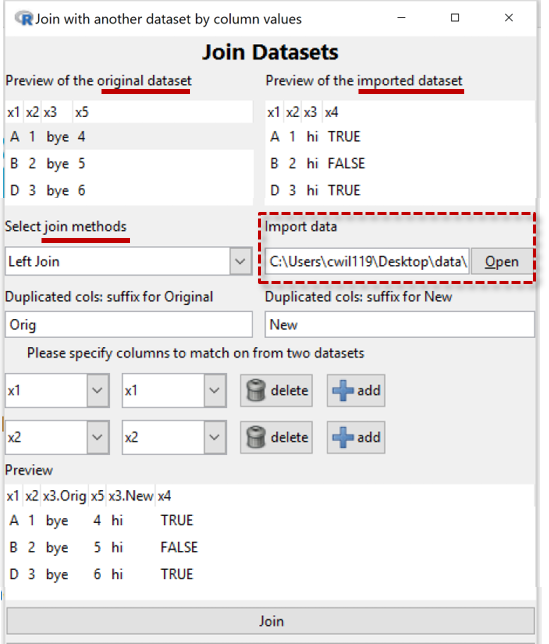
In the Example, we have rejected x3 using the delete button beside it and so have effectively told the program that it is units with the same values of both x1 and x2 that belong together.
- The Preview panel shows us the effects of our choices
Click the Join button at the bottom once you are happy with the way the data is being joined.
The details of how the data is treated depend on the type of Join and we will document that after finishing describing the Example.
In the Example, x4 is a new variable so that has been added to the preview-dataset. A complication is x3 which is in both datasets but with different values for the "same" units. So the program has decided to make two variables, one for the x3 values from the original dataset and one for the x3 values from the new dataset.
Types of joins
Left join
- The joined dataset has rows corresponding to all of the rows in the original dataset and all of its columns.
- Rows of the new dataset that do not have a match in the original dataset are not used.
- The joined dataset also has the columns from the new dataset that were not used for matching.
- Rows in the original that have no match in the newly imported dataset get
NAs for the additional columns
Rows from the original dataset that have more than one match in the new dataset generate multiple rows in the joined dataset (which invalidates many simple analyses). For example, if there are 3 matches then the original (single) row will be replaced by 3 rows. The cell-values for the additional columns will be obtained from the new data set and the values for the original columns from repeating the original cell values.
How other joins differ from the Left Join
-
Inner Join: Only use rows corresponding to matches between the two datasets
-
Full Join (Outer Join): Also use all the non-matching rows from both data sets
-
Right Join: iNZight does not have this. Just import the datasets in the reverse order and use a left join.
The following are just used to filter data. No columns are added to the join from the new dataset.
-
Semi Join: Use only rows in the original which have a match in the new
-
Anti Join: Use only rows in the original which have no match in the new