Separate Columns
Sometimes a variable contains several distinct pieces of information within, for example a name variable might contain "first-name last-name". iNZight allows you to separate these into separate columns or rows.
To separate columns, to go Dataset > Dataset operation > Separate columns and choose the desired method.

Separate into columns
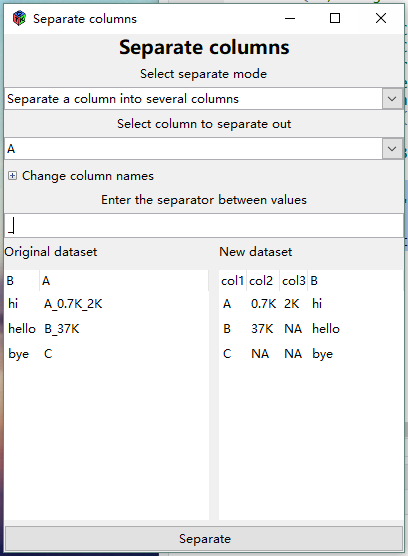
Allows you to separate a column into several columns using a user-defined separator.
- It will separate at every instance of the separator until no further separators are found
If no separator is found, the additional columns formed will contain NAs.
In the example, we have asked to separate column A using an underscore (“_”) as a separator.
Because only column A is being separated, column B (or any other columns) is left unchanged in the resulting new dataset
The maximum number of fields in column A after separation is 3 ("A_0.7K_2K") so column A in the original dataset is being replaced by 3 columns with default column names (Col1, etc).
- Expanding Change column names (click the "+") allows you to change the default column names to something else.
Separate into rows
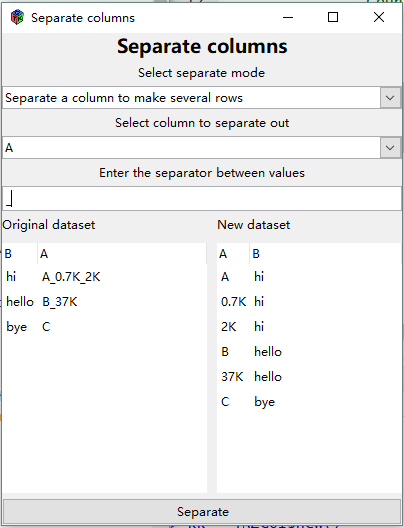
Instead of forming more columns this version of Separate keeps the same number of columns, with the same names, but writes more rows.
Using the same data as in the example above, the entry "A_0.7K_2K" in column A in the original dataset results in 3 rows in column A in the new dataset.
- The corresponding entries in any other columns (e.g. column B in the example) are duplicated.