Reshape
There are two common ways for a dataset to be structured.
Long format is where each row represents a single observation and each column represents a variable. This is the most common format for datasets, and is preferred for use in iNZight and R.
Wide format is where each row represents a single individual with observations in columns.
To reshape a dataset, go to Datasets and choose Reshape dataset.

Wide to long
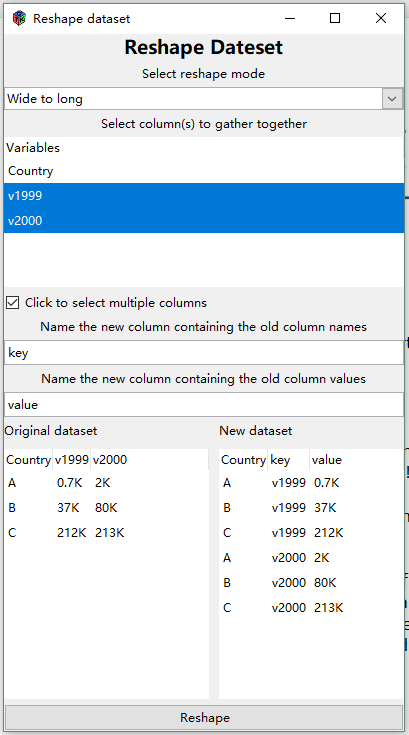
This allows you to select a column or multiple columns from your dataset.
- One new column (default name
key) is populated by the column name(s) of the selected column(s) - The other new column (default name
value) will contain the column value from the selected columns. - The selected column(s) will be removed and two new columns will be added to the dataset.
- A preview panel shows what the new dataset will look like.
Long to wide
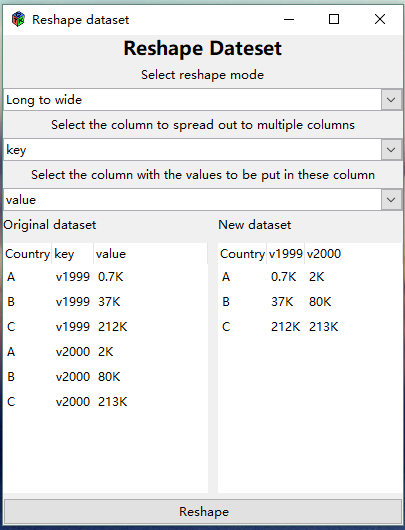
You can select a column to spread out into multiple columns (the column is named key in the example).
It will use the column values of the selected column as a set of names for new columns.
You then select another column with corresponding values to be put into the new columns (the column is named value in the example).